
Family law
Separation Agreement
Free template from Minute Notary, an Ontario notary office. A domestic contract settling property, support, and parenting when a relationship or marriage ends. Fill it in online, download a ready-to-sign PDF, and have signatures witnessed in Ontario. Each party should obtain independent legal advice.
No charge until a notary signs it
Word files are editable. Review any changes carefully before signing or uploading.
Also known as
- Domestic Contract (Separation)
- Marital Separation Agreement
- Separation Contract
+1 more names
- Divorce Settlement Agreement
The blanks fill themselves in as you type.
- Scope
- General template, not legal advice
- Formats
- PDF + editable Word downloads
- Builder
- Live preview as you type
Document progress
1 of 26 fields complete
Drafts stay in this browser.
Avoid saving personal information on a shared or public device.
Recommended. Work through one section at a time.
Your Full Legal Name*
Your Complete Address*
Former partner's full name*
Former partner's complete address*
Download now or complete the required fields.
1 of 25 required fields complete.
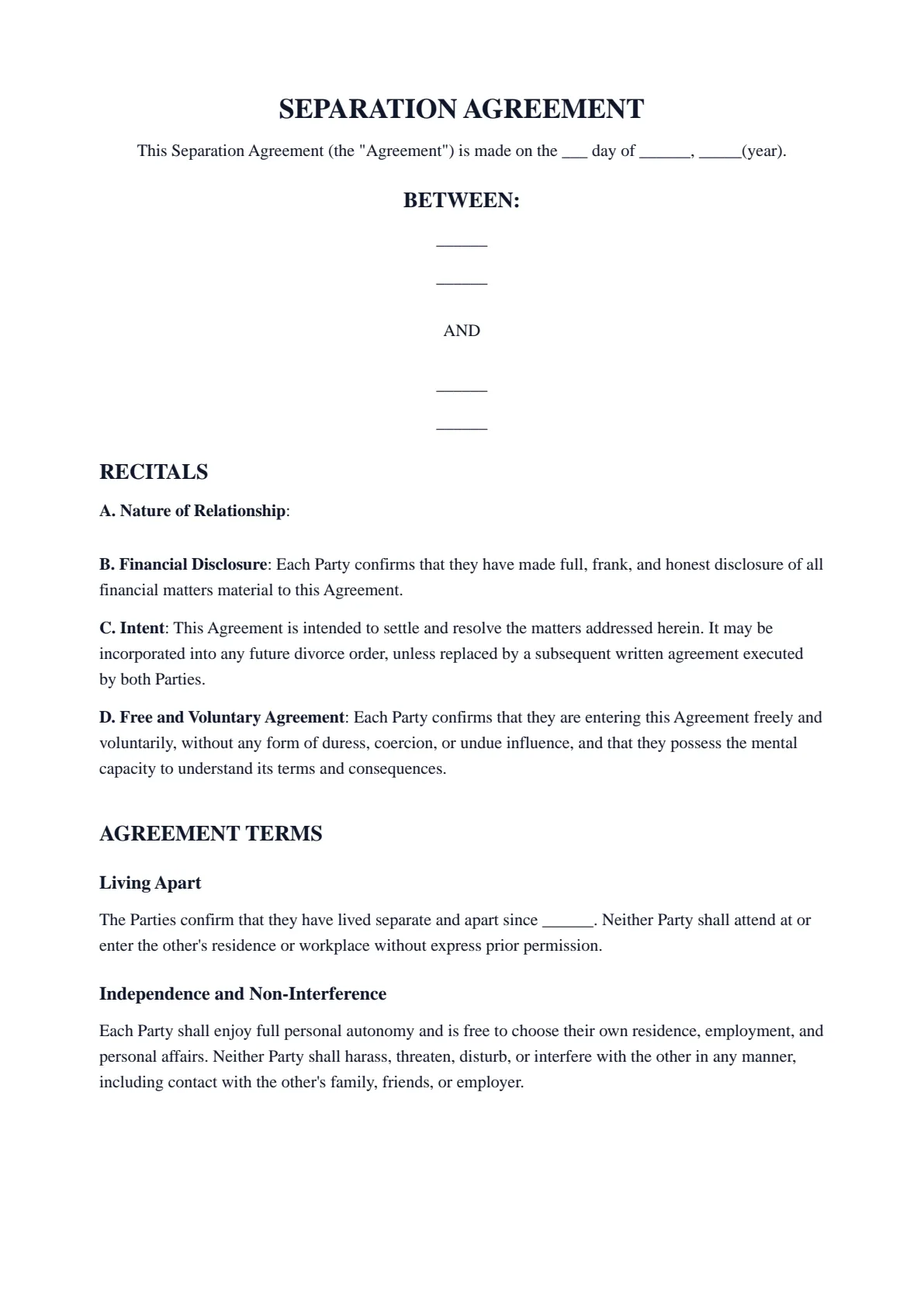
SEPARATION AGREEMENT
This Separation Agreement (the "Agreement") is made on the ___ day of ______, _____(year).
BETWEEN:
______
______
AND
______
______
RECITALS
A. Nature of Relationship:
B. Financial Disclosure: Each Party confirms that they have made full, frank, and honest disclosure of all financial matters material to this Agreement.
C. Intent: This Agreement is intended to settle and resolve the matters addressed herein. It may be incorporated into any future divorce order, unless replaced by a subsequent written agreement executed by both Parties.
D. Free and Voluntary Agreement: Each Party confirms that they are entering this Agreement freely and voluntarily, without any form of duress, coercion, or undue influence, and that they possess the mental capacity to understand its terms and consequences.
AGREEMENT TERMS
Living Apart
The Parties confirm that they have lived separate and apart since ______. Neither Party shall attend at or enter the other's residence or workplace without express prior permission.
Independence and Non-Interference
Each Party shall enjoy full personal autonomy and is free to choose their own residence, employment, and personal affairs. Neither Party shall harass, threaten, disturb, or interfere with the other in any manner, including contact with the other's family, friends, or employer.
CHILDREN
Children of the Relationship
SPOUSAL SUPPORT
PROPERTY DIVISION
Agreement Regarding Division of Property
The Parties confirm that all property held jointly or individually, including any assets, possessions, or financial interests obtained during the course of the relationship, has been divided in a manner both Parties consider equitable, final, and satisfactory.
The Parties agree to the following division of jointly held assets and property, reflecting their mutual agreement or transfer of ownership. Each Party relinquishes any future claim to the jointly held property assigned to the other.
EQUALIZATION OF NET FAMILY PROPERTY
Equalization of Net Family Property
Each Party acknowledges their respective rights and obligations under the Family Law Act with respect to the equalization of net family property.
DEBTS AND LIABILITIES
Responsibility for Individual Debts
Each Party shall remain solely liable for all debts, obligations, and loans incurred in their own name, whether or not such debts relate to an asset retained under this Agreement or are specifically enumerated herein. This includes, without limitation, all personal loans, credit facilities, credit card debts, tax liabilities, and any other financial obligations.
Each Party shall indemnify and hold the other harmless from any claim, demand, or liability arising from such individual debts.
Special and Extraordinary Expenses
Where applicable, special or extraordinary expenses shall be apportioned between the Parties in proportion to their respective incomes, unless a different arrangement is agreed upon.
No Future Debt in the Other's Name
From the date of this Agreement, neither Party shall incur or attempt to incur any debt or financial obligation in the name of, or on the credit of, the other Party. Each Party shall bear sole responsibility for all debts they incur in their own name going forward.
All debts and financial obligations arising prior to the date of this Agreement shall remain the sole responsibility of the Party who incurred them, regardless of whether the obligation is connected to a joint account or credit facility. Each Party agrees to indemnify and hold harmless the other from any liability associated with such pre-existing debts.
EXECUTION
______
Signature: _________________________________________
Print Name: ________________________________________
Address: ______
Date: _____________________________________________
______
Signature: _________________________________________
Print Name: ________________________________________
Address: ______
Date: _____________________________________________
Witness for ______
Signature: _________________________________________
Print Name: ________________________________________
Address: _________________________________________
Date: _____________________________________________
Witness for ______
Signature: _________________________________________
Print Name: ________________________________________
Address: _________________________________________
Date: _____________________________________________
- 01Work your wayGuided or All fieldsFinish one section at a time, or see every question in one form.
- 02See the resultLive document previewWatch this document update as you add each answer.
- 03Keep your placeSave and restore a draftSave progress in this browser, then restore it later on this device.
How it works
Prepare your document, one step at a time.
Answer the questions, choose the download you need, then continue with signing or booking.
Overview
About this document
- 01
What is a separation agreement?
A separation agreement — a domestic contract under Ontario family law — lets separating spouses or partners settle property division, spousal or child support, and parenting arrangements without going to court.
Minute Notary's free separation agreement template for Ontario sets these terms out in a ready-to-sign PDF: you fill in the details online, download it, and have the signatures witnessed.
A clear, agreed contract can reduce conflict and cost when a relationship ends.
- 02
When you might use one
It is used by separating spouses or partners.
- Settling property and finances after separation.
- Agreeing on spousal or child support.
- Setting out parenting time and decision-making for children.
- 03
Important — independent legal advice
For a separation agreement to be sound, it should generally be in writing, signed, and witnessed, with full and honest financial disclosure by both parties. Courts can set one aside in some circumstances, particularly where disclosure or fairness is lacking, and arrangements for children must serve the child’s best interests.
Each party should obtain their own independent legal advice before signing. A notary can witness the signatures, but witnessing is not legal advice.
- 04
How to notarize a separation agreement in Ontario
Once you have filled in your separation agreement and downloaded the PDF, do not sign it in advance if a witnessed signature is needed. A notary public can witness your signatures and apply the notarial seal.
Minute Notary witnesses separation agreements in person, on a mobile visit: each of you signs in front of the notary, so the signing cannot be completed in an online appointment. The sworn paperwork around the agreement can be done online by secure video under O. Reg. 431/20, for example the Form 26B affidavit for filing the agreement with the court. Bring valid government-issued photo identification.
- Fill in the document online and download a clean, ready-to-sign PDF — free, no account.
- Present valid photo ID; we witness your signature and apply the notary seal.
- Whether a court, bank or other office accepts the signed agreement is its decision, and confirming that is your responsibility.
Field guide
Every box, explained.
What each box in the Separation Agreement asks for, in the same order as the form. Tap or click any box below to see what it means, when it applies and how to fill it in.
- Boxes
- 49
- Required
- 46
- Sections
- 11
Before you start
Have at hand both full legal names as on your photo ID, both current addresses and your date of separation. Also have your marriage certificate if you married, the children's birth certificates, and what each of you owns and owes, with values. Seven boxes appear back in section 01, The Parties, after later answers: open it again before you finish.
1.1Your Full Legal NameRequiredYour own first, middle and last names in full, as on your government-issued photo ID.See how to fill it inHide the details
- What it means
- It names you as one of the Parties (the two people making and bound by this agreement). It opens the agreement, heads your parenting schedule and your list of assets, and prints above your signature line.
- When it applies
- Either of you may fill in the form. The person named here is 'you' in every later question, so 'your parenting schedule', 'I'll be making most decisions' and 'your assets' all mean this person.
- How to fill it in
- Copy the spelling from your ID, with no nickname or initials unless the ID uses them. If the name you use every day differs from your ID, keep the ID name and ask the notary. Edit it here and every place it prints updates.
Example Your Full Legal Name
Maria Lopez
1.2Your Complete AddressRequiredThe address where you live now, on one line: unit, street number and name, city or town, province and postal code.See how to fill it inHide the details
- What it means
- It prints under your name at the top of the agreement, and again after 'Address:' in your signature block. With your name, it identifies you as a Party.
- When it applies
- Give where you live today, even if you moved out of the home you shared. If you two still live at the same address, the Living Apart clause may not fit: it says neither of you may enter the other's residence without permission. Ask your lawyer before signing.
- How to fill it in
- Write it as it appears on a recent bill or letter sent there, with commas between the parts. The box is plain text: nothing is looked up for you. If you move before signing, change it and download again.
Example Your Complete Address
Unit 4, 123 Example Street, Ottawa, ON K1A 0B1
1.3Former partner's full nameRequiredYour former partner's first, middle and last names in full, as on their government-issued photo ID.See how to fill it inHide the details
- What it means
- Your former partner is the other Party: the spouse or common-law partner you are separating from. Their name prints after yours at the top, heads their parenting schedule and their list of assets, and sits above their signature line.
- When it applies
- 'Former partner' means the person you are separating from, even if you are still legally married. The page says a separation agreement does not mean you are divorced: a divorce is a separate legal step obtained through the court.
- How to fill it in
- Ask your former partner to check the spelling against their ID in the preview. You type it once: every heading and clause that names them reuses this box.
Example Former partner's full name
Daniel Tremblay
1.4Former partner's complete addressRequiredThe address where your former partner lives now, in the same one-line format as yours.See how to fill it inHide the details
- What it means
- It prints under their name at the top of the agreement and after 'Address:' in their signature block, beside their signature.
- When it applies
- Use their current home address. If you do not know it, ask them: they sign the same document and can check it. If you still share one home, ask your lawyer before signing.
- How to fill it in
- Write it as it appears on mail sent there, with commas between the parts. If it changes before signing, edit the box and download again.
Example Former partner's complete address
88 Sample Avenue, Ottawa, ON K1A 0B1
1.5Date of Separation (dd/mm/yyyy)RequiredThe day you and your former partner started living separate and apart.See how to fill it inHide the details
- What it means
- It completes 'The Parties confirm that they have lived separate and apart since', so you both confirm the date. Ontario.ca values property 'as of the day you separated', and one of its time limits for going to court over equalization runs from that day. The child support terms also start from it.
- When it applies
- Justice Canada describes separation as a couple deciding 'to live apart from each other because the relationship has broken down'. If you two do not agree on the day, settle it with your lawyers before signing.
- How to fill it in
- Type the date as dd/mm/yyyy or pick it from the calendar; it prints in year-month-day order. If you are unsure of the exact day, check papers from that time, such as a new lease, before you agree on it.
1.6Monthly Child Support AmountRequiredAppears when you answer “Yes, child support will be paid” to “Will one party provide child support to the other?”.The total child support the paying parent pays each month, as a number.See how to fill it inHide the details
- What it means
- It prints as 'in the amount of $', your figure, 'on a monthly basis'. The clause says the amount follows the Federal Child Support Guidelines. Justice Canada's guide says provincial or territorial guidelines apply to married parents who separated with no divorce applied for, and to parents never married to each other.
- When it applies
- It appears in section 01, The Parties, once you pick 'Yes, child support will be paid' in section 04, Support for Children: go back up and open section 01 to fill it. Ask your lawyer how to work out the amount and which guidelines it follows.
- How to fill it in
- Type digits with cents and no words; the dollar sign already prints, and one you type is dropped. Ontario.ca says child support is based on the number of children, the province or territory where the paying parent lives, and that parent's annual income. It links a federal calculator for a rough estimate.
1.7Parenting Time ScheduleRequiredAppears when you answer “Yes” to “Do you wish to include your Parenting Schedule details?”.When the children are in your care: the days, weekends, holidays and handover times you two agreed.See how to fill it inHide the details
- What it means
- It prints under 'Parenting Schedule for' and your name, after a line saying you 'shall have parenting time with the child(ren) according to the following arrangement:'. Ontario.ca says parenting time is the time your child spends in your care. Fixed lines follow on best interests and cooperation.
- When it applies
- It appears in section 01, The Parties, once you pick 'Yes' for your own schedule in section 06, Parenting Schedule: go back up and open section 01 to fill it. Write only what you have both agreed.
- How to fill it in
- Put each arrangement on its own line; the line breaks you type print as new lines. Name the days and times, who picks up and drops off, and how holidays work.
Example Parenting Time Schedule
Every second weekend, Friday 6 p.m. to Sunday 6 p.m.
1.8Former partner's parenting scheduleRequiredAppears when you answer “Yes” to “Do you wish to include your former partner's Parenting Schedule details?”.When the children are in your former partner's care: the days, weekends, holidays and handover times you agreed.See how to fill it inHide the details
- What it means
- It prints straight under the heading 'Parenting Schedule for' and their name. Unlike your own schedule, no lead-in sentence comes before it. The same fixed lines on best interests and cooperation follow it.
- When it applies
- It appears in section 01, The Parties, once you pick 'Yes' for your former partner's schedule in section 06: go back up and open section 01 to fill it. Agree the wording with them, since it sets out their time with the children.
- How to fill it in
- Start with a full sentence that names your former partner and says when they have the children. Check that the two schedules fit together, with no day given to both of you.
Example Former partner's parenting schedule
Daniel Tremblay will have the children every Wednesday from 4 p.m. to 8 p.m.
1.9Specific Visiting ScheduleRequiredAppears when you answer “Yes” to “Would you like to include a visitation schedule for the children?”.The visits you agreed for the children: who the children visit, on which days and at what times.See how to fill it inHide the details
- What it means
- It completes 'The Parties agree to the following visitation schedule, to commence on', then the start date and a colon. The clause names no parent or person for the visits, so your text must.
- When it applies
- It appears in section 01, The Parties, once you pick 'Yes' in section 07, Children's Visitation Arrangements: go back up and open section 01 to fill it. The template does not say how this differs from the parenting schedules in section 06: ask your lawyer which you need.
- How to fill it in
- Write full sentences and end with a full stop: nothing is added after your text. If you also fill in parenting schedules, make sure the days here do not contradict them.
Example Specific Visiting Schedule
The children will visit Daniel Tremblay every Sunday from 10 a.m. to 4 p.m.
1.10Monthly spousal support amountRequiredAppears when you answer “Yes” to “Would you like to address spousal support?”.The monthly spousal support amount, as a number only, despite the large box.See how to fill it inHide the details
- What it means
- It prints as 'in the amount of $', your figure, 'on a monthly basis', from the start date. The clause ends support automatically on the death of either of you, or when the recipient remarries or starts living with someone else as a couple.
- When it applies
- It appears in section 01, The Parties, once you pick 'Yes' in section 08, Spousal Support: go back up and open section 01 to fill it. Ontario.ca says the amount depends on factors such as the difference in your incomes, children, ages and health. Ask your lawyer what fits.
- How to fill it in
- Type digits with cents and no words. The dollar sign already prints, and one you type is dropped. Leave out 'per month': the sentence already says 'on a monthly basis'.
1.11Spousal Support Start DateRequiredAppears when you answer “Yes” to “Would you like to address spousal support?”.The date the first monthly spousal support payment is due.See how to fill it inHide the details
- What it means
- It completes 'commencing on', so it fixes when the monthly payments begin. They then continue each month until one of the ending events the clause names.
- When it applies
- It appears in section 01, The Parties, beside the amount, once you pick 'Yes' in section 08, Spousal Support. If support has already been paid since you separated, ask your lawyer which date to use.
- How to fill it in
- Type the date as dd/mm/yyyy or pick it from the calendar. It prints in year-month-day order. To change it, edit the box and download again.
1.12Equalization AmountRequiredAppears when you answer “Yes” to “Are equalization payments being made?”.The equalization payment, as a number: the sum one of you pays the other to even out the property each gained during the marriage.See how to fill it inHide the details
- What it means
- It prints as 'the sum of $', your figure, then 'on or before' the due date. The clause says you have completed your net family property calculation (explained under the equalization question in section 08). Once this sum is received, no further equalization entitlement exists.
- When it applies
- It appears in section 01, The Parties, once you pick 'Yes' to equalization payments in section 08: go back up and open section 01 to fill it. Ontario.ca's steps include subtracting the smaller amount from the larger and dividing the difference by two. Have your lawyer check the figure.
- How to fill it in
- Type digits with cents and no words. The dollar sign already prints, and one you type is dropped. Use the final figure you both accept.
Good to know
Before you fill it in.
Short notes on this template. Worth a minute before you start.
- 01
Prepared for use in Ontario. A general template, not legal advice.
- 02
Fill it in online for free and download a ready-to-sign PDF — no account required.
- 03
Sign in front of the notary, who witnesses your signature and applies the seal.
- 04
Signed in person on a mobile visit, with each of you in front of the notary; it is not done in an online appointment.
Frequently asked
Questions about the Separation Agreement
- Is a separation agreement legally binding in Ontario?
- A domestic contract can be binding if properly made — generally in writing, signed, and witnessed, with full financial disclosure. Courts can set one aside in some circumstances, so independent legal advice is important.
- Do we both need lawyers?
- It is strongly recommended. Each party should obtain their own independent legal advice so the agreement is fair and more likely to hold up.
- Does a separation agreement mean we are divorced?
- No. It settles the terms of separation. A divorce is a separate legal step obtained through the court.
- Can a notary witness our signatures?
- Yes, in person. Minute Notary witnesses separation agreements on a mobile visit, where each of you signs in front of the notary; it cannot be completed in an online appointment. Witnessing is not legal advice.
Keep exploring
Related templates
Other documents for family court, divorce & agreements.
- 01Affidavit for Filing Domestic Contract with Court (Form 26B) — Ontario
The sworn affidavit a party files with a domestic contract, such as a separation agreement, so its support terms can be enforced or changed as if they were a court order. Prepare the wording here; the court's own Form 26B is what you file.
Fill it out - 02Cohabitation Agreement
A domestic contract between common-law or cohabiting partners setting out property, support, and other arrangements. Fill it in online, download a ready-to-sign PDF, and have signatures witnessed in Ontario. Each partner should obtain independent legal advice.
Fill it out - 03Affidavit for Divorce (Form 36)
Affidavit for Divorce (Form 36), an Ontario family court affidavit used to support an uncontested divorce. Fill in your details online, download a ready-to-sign PDF, and swear it before a notary or commissioner. Obtain legal advice for family court matters.
Fill it out - 04Affidavit Confirming the Identity of Another Person
A sworn affidavit by someone who knows you, confirming your identity and particulars — useful where a person cannot prove their identity with standard documents. Fill it in online, download a ready-to-sign PDF, and notarize in Ontario.
Fill it out
Ready to sign?
Ready to create your Separation Agreement?
Fill it in online, then download a ready-to-sign PDF or an editable Word copy. We sign this document with you in person. Not sure what the appointment involves? Read about the Power of Attorney service first.