
Family law
Affidavit for Filing Domestic Contract with Court (Form 26B) — Ontario
Free template from Minute Notary, an Ontario notary office. The sworn affidavit a party files with a domestic contract, such as a separation agreement, so its support terms can be enforced or changed as if they were a court order. Prepare the wording here; the court's own Form 26B is what you file.
No charge until a notary signs it
Word files are editable. Review any changes carefully before signing or uploading.
Also known as
- Form 26B
- Affidavit for filing domestic contract
- File a separation agreement with the court Ontario
+2 more names
- Section 35 Family Law Act affidavit
- Register a separation agreement with the court
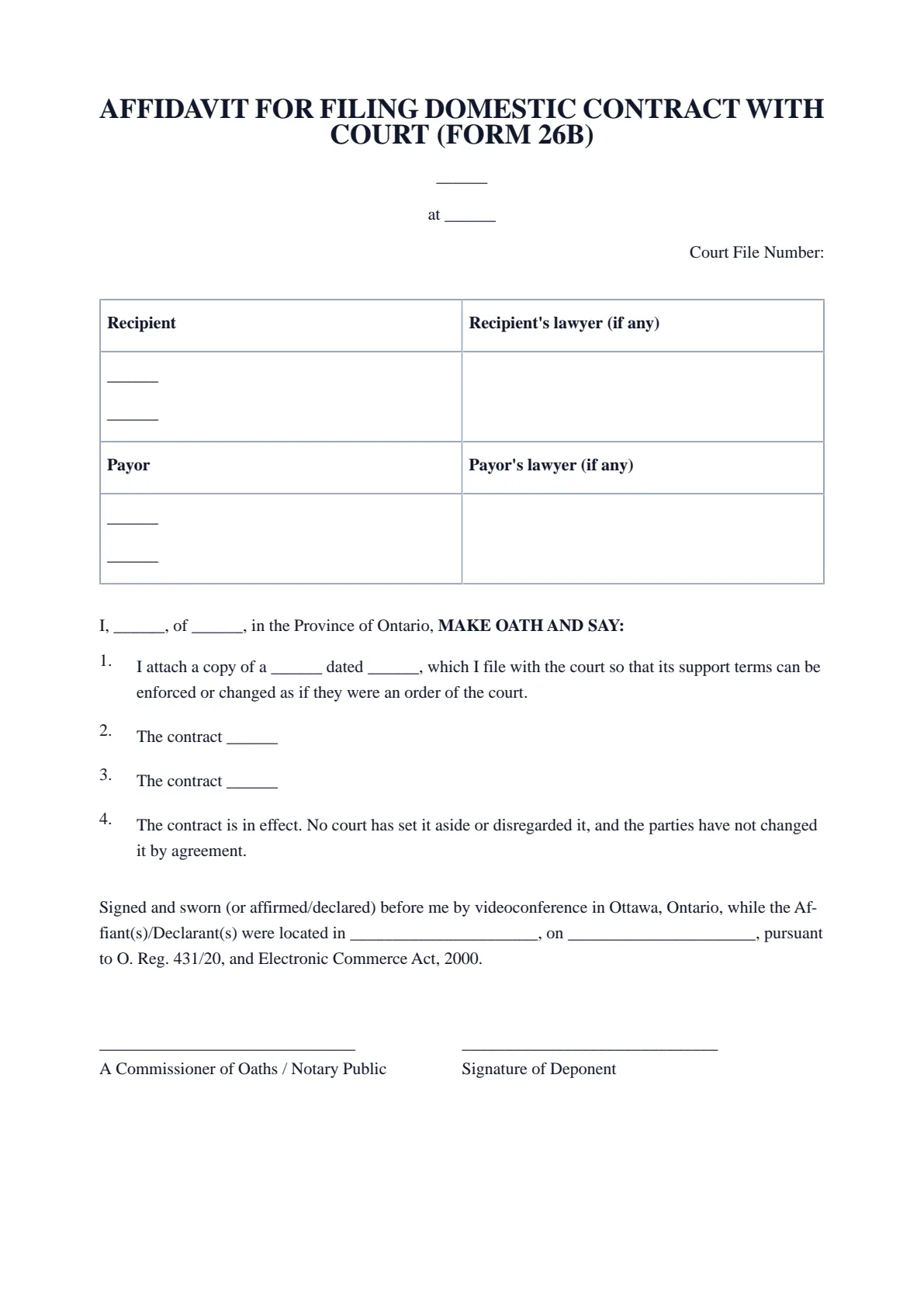
The blanks fill themselves in as you type.
- Scope
- General template, not legal advice
- Formats
- PDF + editable Word downloads
- Builder
- Live preview as you type
Affidavit for Filing Domestic Contract with Court (Form 26B) — Ontario
A compact preview of this template
01The Court
Court file number (if any)
Recipient: full legal name
Type of contract
AFFIDAVIT FOR FILING DOMESTIC CONTRACT WITH COURT (FORM 26B)
______
at ______
Court File Number:
Recipient | Recipient's lawyer (if any) |
______ ______ | |
Payor | Payor's lawyer (if any) |
______ ______ |
I, ______, of ______, in the Province of Ontario, MAKE OATH AND SAY:
I attach a copy of a ______ dated ______, which I file with the court so that its support terms can be enforced or changed as if they were an order of the court.
The contract ______
The contract ______
The contract is in effect. No court has set it aside or disregarded it, and the parties have not changed it by agreement.
Signed and sworn (or affirmed/declared) before me by videoconference in Ottawa, Ontario, while the Affiant(s)/Declarant(s) were located in ______________________, on ______________________, pursuant to O. Reg. 431/20, and Electronic Commerce Act, 2000.
______________________________ | ______________________________ |
- 01Work your wayGuided or All fieldsFinish one section at a time, or see every question in one form.
- 02See the resultLive document previewWatch this document update as you add each answer.
- 03Keep your placeSave and restore a draftSave progress in this browser, then restore it later on this device.
How it works
Prepare your document, one step at a time.
Answer the questions, choose the download you need, then continue with signing or booking.
Overview
About this document
- 01
What is an affidavit for filing a domestic contract?
Under the Family Law Act, a domestic contract includes a marriage contract, a cohabitation agreement, a separation agreement and a paternity agreement. Section 35 lets a party file one with the clerk of the Ontario Court of Justice or of the Family Court of the Superior Court of Justice, together with an affidavit that the contract is in effect and that no court or later agreement has set it aside or varied it.
Form 26B is that affidavit. It identifies the contract and sets out its child support and spousal support terms. Filing affects the support terms only: they can be enforced, varied under section 37, indexed under section 38 (spousal support) or recalculated under section 39.1 (child support) as if they were a court order. The rest of the contract is not turned into an order.
- 02
When you need one
File the contract with Form 26B when you want its support terms to carry the weight of a court order, for example because payments have stopped or because you expect to ask the court to change the amount.
A party may file without the other party's consent, and a clause in the contract that forbids filing does not stop it (section 35 (4)). A guardian of property or an attorney for property who made the contract for a party counts as a party (section 35 (1.1)). A family arbitration award is filed with a different affidavit, Form 26D (rule 26 (9.1)).
- 03
What to include
Have the signed contract in front of you:
- The court, its office address, and the court file number if there already is one.
- The recipient's and the payor's full legal names and addresses for service, and their lawyers' details if any.
- The type of contract and its date.
- For child support: who pays whom, the monthly amount, each child's name and date of birth, any special expenses, and the two incomes the contract uses.
- For spousal support: who pays whom, the monthly amount, and the end date if the contract sets one.
- A copy of the contract, attached to the affidavit.
- 04
Official source and who accepts it
The court accepts only the prescribed Form 26B. Download the current revision, dated May 26, 2025, from Ontario Court Services, copy your prepared wording onto it, and attach a copy of the contract.
The form is signed in front of a lawyer, justice of the peace, notary public or commissioner for taking affidavits, and its jurat records the municipality and the province, state or country where it is sworn. File it with the clerk of the Ontario Court of Justice or the Family Court of the Superior Court of Justice.
- 05
Common mistakes
Check these before the appointment:
- Filing a contract that a court has set aside, or that the parties have since changed by agreement.
- Leaving out the children's dates of birth or the incomes the child support was based on.
- Using an older revision of Form 26B instead of the May 26, 2025 version.
- Expecting property terms to become enforceable like an order: only the support terms do.
- 06
How to get it notarized in Ontario
Fill in the form on this page to prepare your wording, then copy it onto the official form. Do not sign it yet: an affidavit or statutory declaration is signed in front of a notary public or commissioner for taking affidavits, after the oath or affirmation.
When you are ready, book an appointment with Minute Notary and have the official form filled in but unsigned. You can swear or affirm it before a notary by video from anywhere in Ontario, or in person on a mobile visit.
Good to know
Before you fill it in.
Short notes on this template. Worth a minute before you start.
- 01
Prepared for use in Ontario. A general template, not legal advice.
- 02
Notarize online by video across Ontario, or in person anywhere in Ontario.
- 03
Sign in front of the notary, who administers your oath or affirmation and applies the seal.
Official sources
Frequently asked
Questions about the Affidavit for Filing Domestic Contract with Court (Form 26B) — Ontario
- Who can file a domestic contract with the court?
- A party to it. The Family Law Act also treats as a party a guardian of property or an attorney for property who made the contract on a party's behalf.
- Does filing make the whole contract a court order?
- No. Only the support terms can be enforced, varied or recalculated as if they were a court order (section 35 (2) of the Family Law Act).
- Does the other party have to agree?
- No. Either party may file, and a term in the contract saying otherwise does not prevent filing or enforcement (section 35 (4)).
- Can the support terms still be challenged after filing?
- Yes. A court can still set aside a support term in the situations section 33 (4) describes, such as where it results in unconscionable circumstances (section 35 (3)).
- Can I swear Form 26B by video?
- Yes. Our notaries can commission it by video under O. Reg. 431/20 from anywhere in Ontario, and the form's jurat records where you are when you swear it.
Keep exploring
Related templates
Other documents for family court, divorce & agreements.
- 01Cohabitation Agreement
A domestic contract between common-law or cohabiting partners setting out property, support, and other arrangements. Fill it in online, download a ready-to-sign PDF, and have signatures witnessed in Ontario. Each partner should obtain independent legal advice.
Fill it out - 02Separation Agreement
A domestic contract settling property, support, and parenting when a relationship or marriage ends. Fill it in online, download a ready-to-sign PDF, and have signatures witnessed in Ontario. Each party should obtain independent legal advice.
Fill it out - 03Affidavit of Service (Form 6B)
The Affidavit of Service (Form 6B) used in Ontario family court to prove that documents were served. Fill in your details online, download a ready-to-sign PDF, and swear it before a notary or commissioner.
Fill it out - 04Affidavit for Uncontested Trial (Form 23C)
Affidavit for Uncontested Trial (Form 23C), an Ontario family court affidavit used to present evidence for an uncontested trial. Fill in your details online, download a ready-to-sign PDF, and swear it before a notary or commissioner. Obtain legal advice for family court matters.
Fill it out
Ready to sign?
Ready to create your Affidavit for Filing Domestic Contract with Court (Form 26B) — Ontario?
Fill it in online, then download a ready-to-sign PDF or an editable Word copy. Use the generated PDF to continue to booking. Not sure what the appointment involves? Read about the Affidavits service first.