
Affidavits
Affidavit of Lost Document
Free template from Minute Notary, an Ontario notary office. A sworn affidavit confirming that an important document has been lost — used to support a request for a replacement or to rely on a copy. Fill it in online, download a ready-to-sign PDF, and notarize in Ontario.
No charge until a notary signs it
Word files are editable. Review any changes carefully before signing or uploading.
Also known as
- Lost Document Affidavit
- Declaration of Lost Original
- Affidavit of Loss
+2 more names
- Sworn Statement of Lost Document
- Lost Original Affidavit
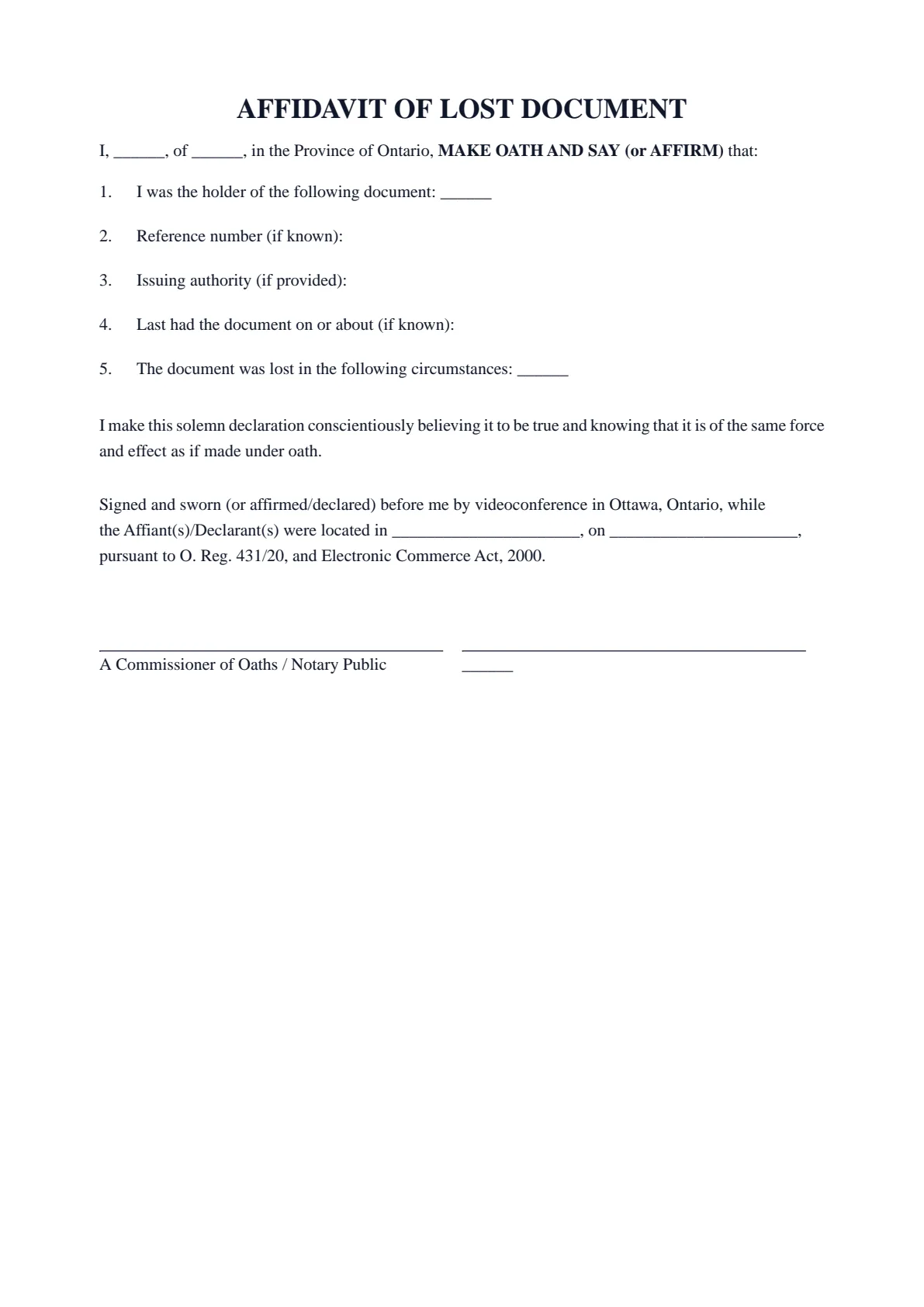
The blanks fill themselves in as you type.
- Scope
- General template, not legal advice
- Formats
- PDF + editable Word downloads
- Builder
- Live preview as you type
Document progress
1 of 7 fields complete
Drafts stay in this browser.
Avoid saving personal information on a shared or public device.
Recommended. Work through one section at a time.
Your full legal name*
Your full address*
Download now or complete it to use for booking.
1 of 4 required fields complete for booking.
AFFIDAVIT OF LOST DOCUMENT
I, ______, of ______, in the Province of Ontario, MAKE OATH AND SAY (or AFFIRM) that:
I was the holder of the following document: ______
Reference number (if known):
Issuing authority (if provided):
Last had the document on or about (if known):
The document was lost in the following circumstances: ______
I make this solemn declaration conscientiously believing it to be true and knowing that it is of the same force and effect as if made under oath.
Signed and sworn (or affirmed/declared) before me by videoconference in Ottawa, Ontario, while the Affiant(s)/Declarant(s) were located in ______________________, on ______________________, pursuant to O. Reg. 431/20, and Electronic Commerce Act, 2000.
A Commissioner of Oaths / Notary Public | ______ |
- 01Work your wayGuided or All fieldsFinish one section at a time, or see every question in one form.
- 02See the resultLive document previewWatch this document update as you add each answer.
- 03Keep your placeSave and restore a draftSave progress in this browser, then restore it later on this device.
How it works
Prepare your document, one step at a time.
Answer the questions, choose the download you need, then continue with signing or booking.
Overview
About this document
- 01
What is an affidavit of lost document?
It is a sworn statement — also called a lost document affidavit or declaration of lost original — confirming that a specified document has been lost and cannot be located.
Some issuers and institutions ask for it before they will issue a replacement or accept a copy.
- 02
When you might need one
It supports replacing or relying on a lost document.
- A certificate, agreement, title, or other original has been lost.
- An issuer asks for a sworn affidavit before providing a replacement.
- You must rely on a copy because the original cannot be found.
- 03
What to include
Describe the document, when and how it was lost, and confirm it has not been transferred, sold, or used by you. State that you will return the original if it is found, where that applies.
- 04
How to notarize an affidavit of lost document in Ontario
After you fill in your affidavit of lost document and download the PDF, do not sign it in advance. A sworn document must be signed in front of a notary public or commissioner for taking affidavits, who administers your oath or solemn affirmation first.
Minute Notary commissions your affidavit of lost document online by secure video, under Ontario's remote commissioning rules (O. Reg. 431/20), or in person anywhere in Ontario. Bring valid government-issued photo identification so we can verify your identity before applying the notary seal.
Field guide
Every box, explained.
What each box in the Affidavit of Lost Document asks for, in the same order as the form. Tap or click any box below to see what it means, when it applies and how to fill it in.
- Boxes
- 7
- Required
- 4
- Sections
- 2
Before you start
Have at hand anything that still shows the lost document's details (a photocopy, a photo, a letter or statement from the issuer). Also have at hand the name of the office or company that issued it, and roughly when you last had it. Check first whether the issuer has its own lost-document form.
1.1Your full legal nameRequiredYour own full legal name, as the person who held the lost document and now swears or affirms that it is lost.See how to fill it inHide the details
- What it means
- An affidavit is a written statement you swear or affirm is true before a commissioner (an official allowed to take oaths and affirmations). Your name opens it ('I, …, of …') and prints under your signature line. Paragraph 1 then says 'I was the holder of the following document', so the reader takes you to be the person who had it.
- When it applies
- Fill it in every time. The body has one 'I'. The document may have been in someone else's name (your child's, a late relative's, your company's). Or you may not be sure 'holder' describes you. If so, ask the office that asked for the affidavit who should swear it, or speak to the notary before signing.
- How to fill it in
- Write your first, middle and last names in full, as on the government-issued photo ID you will show when you swear it. Avoid nicknames and initials unless your ID uses them. If the lost document was your only photo ID, ask the notary what to bring before you book. The box fills both places where your name appears.
Example Your full legal name
Maria Lopez
1.2Your full addressRequiredYour full home address: where you live now.See how to fill it inHide the details
- What it means
- It prints in the opening line, 'I, [your name], of [your address], in the Province of Ontario', as the box hint says. With your name, it identifies you as the person making the sworn statement.
- When it applies
- Fill it in every time, with where you live today, even if the lost document shows an older address. If you live outside Ontario, the fixed words 'in the Province of Ontario' would not be true for you: speak to the notary before you sign.
- How to fill it in
- Type it on one line with commas: street number and name, unit, city, province and postal code. Write where you live, even if you will be somewhere else during a video appointment: the closing line records that place separately, on the day.
Example Your full address
123 Example Street, Unit 4, Ottawa, ON K1A 0B1
Good to know
Before you fill it in.
Short notes on this template. Worth a minute before you start.
- 01
Prepared for use in Ontario. A general template, not legal advice.
- 02
Fill it in online for free and download a ready-to-sign PDF — no account required.
- 03
Sign in front of the notary, who administers your oath or affirmation and applies the seal.
- 04
Notarize online by video across Ontario, or in person anywhere in Ontario.
Frequently asked
Questions about the Affidavit of Lost Document
- When do I need an affidavit of lost document?
- When an original certificate, agreement, title, or other document is lost and an issuer requires sworn confirmation before issuing a replacement or accepting a copy.
- What should it include?
- A description of the document, when and how it was lost, and confirmation it has not been transferred, sold, or misused.
- Can I notarize it online in Ontario?
- Yes. You can swear it online by video under Ontario’s remote commissioning rules, or in person anywhere in Ontario with Minute Notary.
- What if I find the original later?
- State that you will return or stop using the affidavit copy if the original is found, where the issuer requires it.
Keep exploring
Related templates
Other documents for general affidavits & sworn statements.
- 01Statutory Declaration of Loss of a Receipt
A sworn declaration that a receipt has been lost — used to support a claim, reimbursement, warranty, or expense where the original receipt is unavailable. Fill it in online, download a ready-to-sign PDF, and notarize in Ontario.
Fill it out - 02Affidavit of Residency
A sworn affidavit confirming where you live and since when — for an organization that accepts sworn proof of address or residency. Fill it in online, download a ready-to-sign PDF, and notarize in Ontario.
Fill it out - 03Statutory Declaration of Ordinary Residence
A sworn declaration confirming that you ordinarily reside in Ontario — for an organization or program that asks you for a sworn statement of your residency. Fill it in online, download a ready-to-sign PDF, and notarize in Ontario.
Fill it out - 04Statutory Declaration of Surrender of a Document
A sworn declaration confirming that you have surrendered, returned, or given up a document — used to confirm it is no longer in your possession or use. Fill it in online, download a ready-to-sign PDF, and notarize in Ontario.
Fill it out
Ready to sign?
Ready to create your Affidavit of Lost Document?
Fill it in online, then download a ready-to-sign PDF or an editable Word copy. Use the generated PDF to continue to booking. Not sure what the appointment involves? Read about the Statutory Declarations service first.