Affidavits
OSFI Form 2: Attestation Regarding Spouse or Common-Law Partner
Free template from Minute Notary, an Ontario notary office. The sworn attestation in which the owner of a federally regulated locked-in plan tells their financial institution whether they have a spouse or common-law partner, with that person's own sworn consent when they do. Prepare the wording here; OSFI's own Form 2 is what you sign.
No charge until a notary signs it
Word files are editable. Review any changes carefully before signing or uploading.
Also known as
- OSFI spousal consent form
- spousal attestation locked-in RRSP
- Form 2 Schedule V PBSR
+2 more names
- federal LIF spouse consent
- common-law partner attestation pension unlocking
The blanks fill themselves in as you type.
- Scope
- General template, not legal advice
- Formats
- PDF + editable Word downloads
- Builder
- Live preview as you type
OSFI Form 2: Attestation Regarding Spouse or Common-Law Partner
A compact preview of this template
01Your financial institution and plans
Name of your financial institution
Your full name
On the day you sign, do you have a spouse or common-law partner?
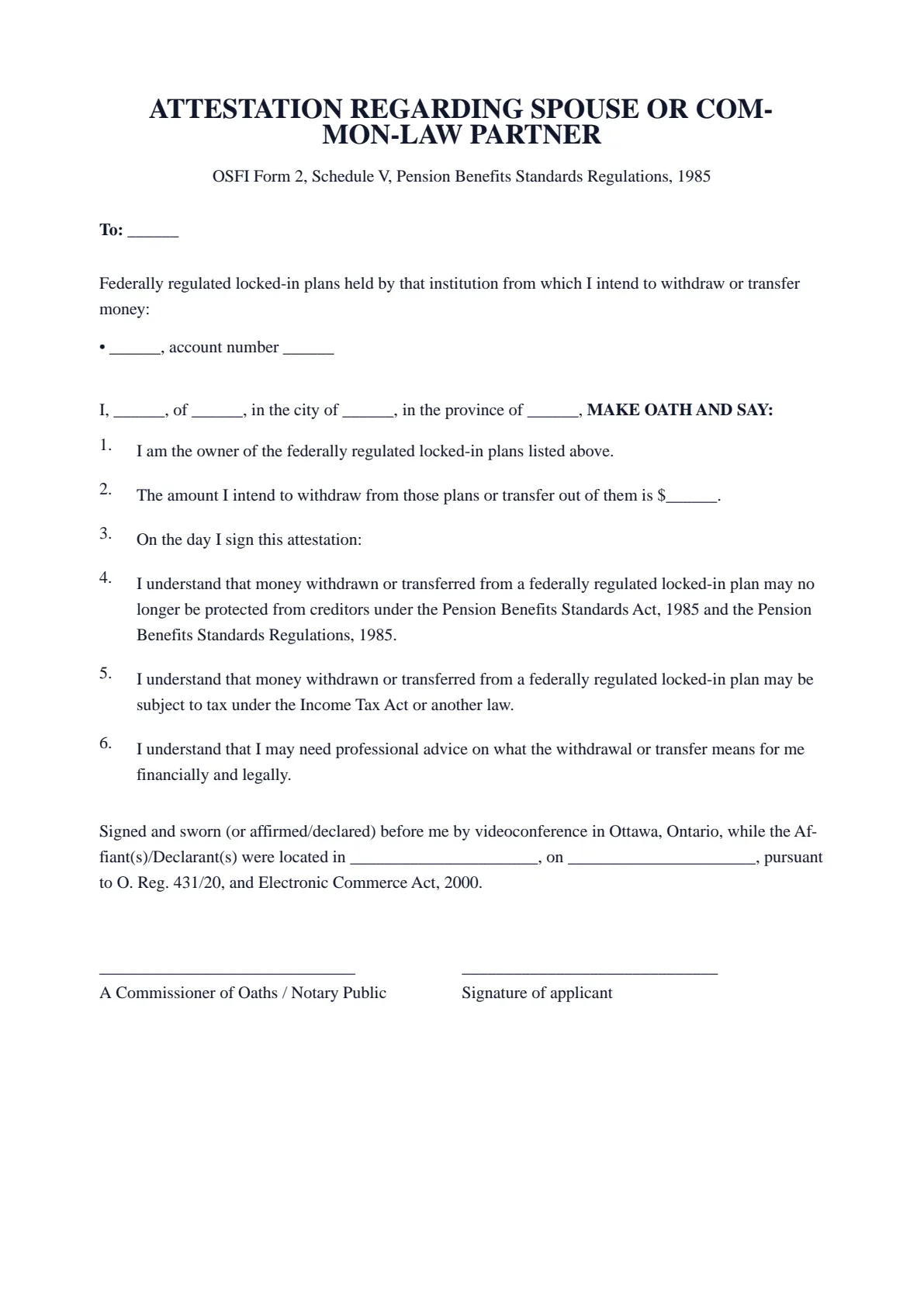
ATTESTATION REGARDING SPOUSE OR COMMON-LAW PARTNER
OSFI Form 2, Schedule V, Pension Benefits Standards Regulations, 1985
To: ______
Federally regulated locked-in plans held by that institution from which I intend to withdraw or transfer money:
• ______, account number ______
I, ______, of ______, in the city of ______, in the province of ______, MAKE OATH AND SAY:
I am the owner of the federally regulated locked-in plans listed above.
The amount I intend to withdraw from those plans or transfer out of them is $______.
On the day I sign this attestation:
I understand that money withdrawn or transferred from a federally regulated locked-in plan may no longer be protected from creditors under the Pension Benefits Standards Act, 1985 and the Pension Benefits Standards Regulations, 1985.
I understand that money withdrawn or transferred from a federally regulated locked-in plan may be subject to tax under the Income Tax Act or another law.
I understand that I may need professional advice on what the withdrawal or transfer means for me financially and legally.
Signed and sworn (or affirmed/declared) before me by videoconference in Ottawa, Ontario, while the Affiant(s)/Declarant(s) were located in ______________________, on ______________________, pursuant to O. Reg. 431/20, and Electronic Commerce Act, 2000.
______________________________ | ______________________________ |
- 01Work your wayGuided or All fieldsFinish one section at a time, or see every question in one form.
- 02See the resultLive document previewWatch this document update as you add each answer.
- 03Keep your placeSave and restore a draftSave progress in this browser, then restore it later on this device.
How it works
Prepare your document, one step at a time.
Answer the questions, choose the download you need, then continue with signing or booking.
Overview
About this document
- 01
What is an attestation regarding spouse or common-law partner?
Federal pension law protects a spouse's or common-law partner's possible share of locked-in money. Before the owner can unlock money on most routes, they swear whether they have a spouse or common-law partner, and that person swears that they understand what they may give up and that they consent.
Section 2 of the Pension Benefits Standards Act, 1985 defines both terms. OSFI's FAQ adds two points: a spouse you have separated from but not divorced still counts, unless a court order or agreement dividing property clearly and unambiguously removes their right to a share of the money, in which case you note it on Form 2 and attach it; and a former common-law partner you no longer live with does not count.
These forms cover federally regulated locked-in money only: a locked-in RRSP, a life income fund (LIF), a restricted life income fund (RLIF) or a restricted locked-in savings plan (RLSP) holding money that came from a pension plan under the Pension Benefits Standards Act, 1985. That means the plans of employers in banking, telecommunications, interprovincial transportation and other federal undertakings. Money moved from the federal public service pension plan into a locked-in RRSP, LIF or RLIF follows the same rules. An Ontario LIRA or LIF that came from an Ontario employer's plan follows FSRA's forms instead, and those need no commissioner. Your account statement or your institution tells you which rules apply.
- 02
When you need one
OSFI's FAQ lists three routes that need Form 2:
- a financial hardship withdrawal, with Form 1;
- the one-time transfer of up to 50% of a restricted life income fund (RLIF) to an RRSP or RRIF, if you are 55 or older, or turn 55, in the calendar year, and act within 60 days after the money first goes into the RLIF;
- the small-balance withdrawal at 55 or older within the calendar year, when your federal locked-in plans total no more than half of the YMPE, with Form 3.
- For withdrawals up to December 31, 2026, the Year's Maximum Pensionable Earnings (YMPE) is $74,600, so half of it is $37,300. The figure changes every January, and the current year's Form 1 instructions give the current amounts.
- Non-residency and shortened life expectancy unlocking do not need spousal consent under the Act or the Regulations, but an institution may still ask for a form of consent under its own procedures.
- 03
What to include
Each person who swears needs:
- The institution's name and each federal locked-in plan there, with its account number.
- The owner's name, street address, city and province, and the amount to be withdrawn or transferred.
- Whether the owner has a spouse or common-law partner on the day they sign.
- If so, the spouse's or partner's name, street address, city and province.
- If you are separated but not divorced, a copy of any court order or agreement that removes your spouse's right to a share.
- 04
Official source and who accepts it
Your financial institution requires OSFI's own Form 2. Get it from the institution or download it from OSFI, copy the wording you prepared on this page onto it, and swear or affirm it before a notary public, commissioner or other person authorized to take affidavits. This page prepares the wording only; it does not replace the official form.
Send the sworn form to the institution that holds the account, never to OSFI or the Government. The institution decides whether you qualify and processes the request; OSFI does not approve or review individual forms.
The two parts do not have to be sworn together. OSFI's FAQ says the spouse or common-law partner may swear at a different time and before a different notary or commissioner, and a spouse living outside Canada may swear before a notary or other qualified person in their own country. Each person who swears attends an appointment and shows valid photo ID.
OSFI's FAQ says the role of the notary or commissioner "is to verify and witness the individual's signature, not to verify the contents". Our notary does not decide whether you qualify, does not calculate the amount and does not advise your spouse or common-law partner. Money taken out of a locked-in plan may lose the protection from creditors that the Pension Benefits Standards Act, 1985 gives it, and it may be taxable. The forms themselves say you may need professional advice.
- 05
Common mistakes
Watch for these:
- Swearing that you have no spouse because you are separated. A separated spouse still counts unless an order or agreement clearly removes their right to a share.
- Leaving out the spouse's part when you have a spouse or common-law partner.
- Leaving the amount blank: your spouse consents to the withdrawal or transfer stated in your part.
- Using these forms for an Ontario LIRA or LIF, which follows FSRA's forms.
- Signing the form before the appointment instead of in front of the notary.
- 06
How to get it notarized in Ontario
Fill in the form on this page to prepare your wording, then copy it onto OSFI's official form, from your financial institution or from OSFI's website. Do not sign it yet: the attestation is sworn or affirmed in front of a notary public or commissioner for taking affidavits.
When you are ready, book an appointment with Minute Notary and bring the official form filled in but unsigned, with your photo ID. The attestation can be sworn or affirmed before our notary by video across Ontario, or in person on a mobile visit. Ask your financial institution first whether it accepts an attestation sworn by video.
Good to know
Before you fill it in.
Short notes on this template. Worth a minute before you start.
- 01
Prepared for use in Ontario. A general template, not legal advice.
- 02
Notarize online by video across Ontario, or in person anywhere in Ontario.
- 03
Sign in front of the notary, who administers your oath or affirmation and applies the seal.
Official sources
- OSFI: Unlocking forms
- OSFI: Unlocking funds from a pension plan or locked-in retirement savings plan (FAQ)
- OSFI: Form 2, Attestation Regarding Spouse/Common-Law Partner
- Form 2 (PDF)
- Pension Benefits Standards Act, 1985 (section 2 definitions)
- Pension Benefits Standards Regulations, 1985 (sections 20 to 20.3, Schedule V)
Related
- OSFI Form 1: Attestation Regarding Withdrawal Based on Financial Hardship
- OSFI Form 3: Attestation of Total Amount Held in Locked-in Plans
- Affidavit of life certificate (proof of life for a pension)
- Guide: Unlocking a LIRA in Ontario: Forms, Spousal Consent and Who Signs
- Browse all legal templates
- Book a notarization appointment
Frequently asked
Questions about the OSFI Form 2: Attestation Regarding Spouse or Common-Law Partner
- Does my spouse have to consent?
- No one can make them. Without their consent, the routes that need Form 2 stay closed to you. Your spouse or partner should understand what they may give up before they swear; the form itself says they may need professional advice.
- Can my spouse swear at a different time or with a different notary?
- Yes. OSFI's FAQ says the owner and the spouse or partner can swear at different times and before different notaries or commissioners. A spouse who lives outside Canada can swear before a notary or other qualified person in their own country.
- What if I cannot find my spouse?
- If you are separated but not divorced and no court order or agreement removes their right to a share, their consent is still needed. OSFI's FAQ says to get legal advice on your options.
- Can we swear Form 2 by video?
- Yes. Each of you can swear or affirm your part before our notary by video across Ontario, or in person, and you do not have to do it at the same time. Ask your financial institution first whether it accepts an attestation sworn by video.
- Do I need Form 2 for non-residency or shortened life expectancy unlocking?
- Not under the Act or the Regulations, according to OSFI's FAQ, but your institution may still ask for your spouse's consent under its own procedures. Our guide to unlocking a LIRA in Ontario explains the federal and Ontario routes.
Keep exploring
Related templates
Other documents for banks, insurers, employers & pensions.
- 01OSFI Form 1: Attestation Regarding Withdrawal Based on Financial Hardship
The sworn attestation the owner of a federally regulated locked-in plan gives their financial institution to unlock money for financial hardship: low income, high medical or disability-related costs, or both. Prepare the wording and worksheet here; OSFI's own Form 1 is what you sign.
Fill it out - 02OSFI Form 3: Attestation of Total Amount Held in Federally Regulated Locked-in Plans
The sworn attestation in which the owner of federally regulated locked-in plans states their total value, so the whole small balance can be withdrawn or transferred at 55 or older. Prepare the wording here; OSFI's own Form 3 is what you sign.
Fill it out - 03Statutory Declaration of Separation of Legal Spouses or Common-law Partners
A statutory declaration of the separation of legal spouses or common-law partners, used to support a benefit or pension matter. Fill it in online, download a ready-to-sign PDF, and notarize in Ontario.
Fill it out - 04Statutory Declaration of Employment and Income
A sworn declaration confirming your employment and income — used as proof of income for housing, credit, or a program that asks for a sworn statement when standard documents are unavailable. Fill it in online, download a ready-to-sign PDF, and notarize in Ontario.
Fill it out
Ready to sign?
Ready to create your OSFI Form 2: Attestation Regarding Spouse or Common-Law Partner?
Fill it in online, then download a ready-to-sign PDF or an editable Word copy. Use the generated PDF to continue to booking. Not sure what the appointment involves? Read about the Statutory Declarations service first.