
Family law
Statutory Declaration of Guardianship Consent
Free template from Minute Notary, an Ontario notary office. A sworn declaration by a parent consenting to another person caring for, or being appointed guardian of, their child — used to support a guardianship arrangement. Fill it in online, download a ready-to-sign PDF, and notarize in Ontario.
No charge until a notary signs it
Word files are editable. Review any changes carefully before signing or uploading.
Also known as
- Parental Consent to Guardianship
- Guardianship Consent Affidavit
- Consent of Parent to Guardian
+1 more names
- Sworn Guardianship Consent
The blanks fill themselves in as you type.
- Scope
- General template, not legal advice
- Formats
- PDF + editable Word downloads
- Builder
- Live preview as you type
Document progress
1 of 10 fields complete
Drafts stay in this browser.
Avoid saving personal information on a shared or public device.
Recommended. Work through one section at a time.
Your full legal name*
Your full address*
Your relationship to the child*
Download now or complete it to use for booking.
1 of 8 required fields complete for booking.
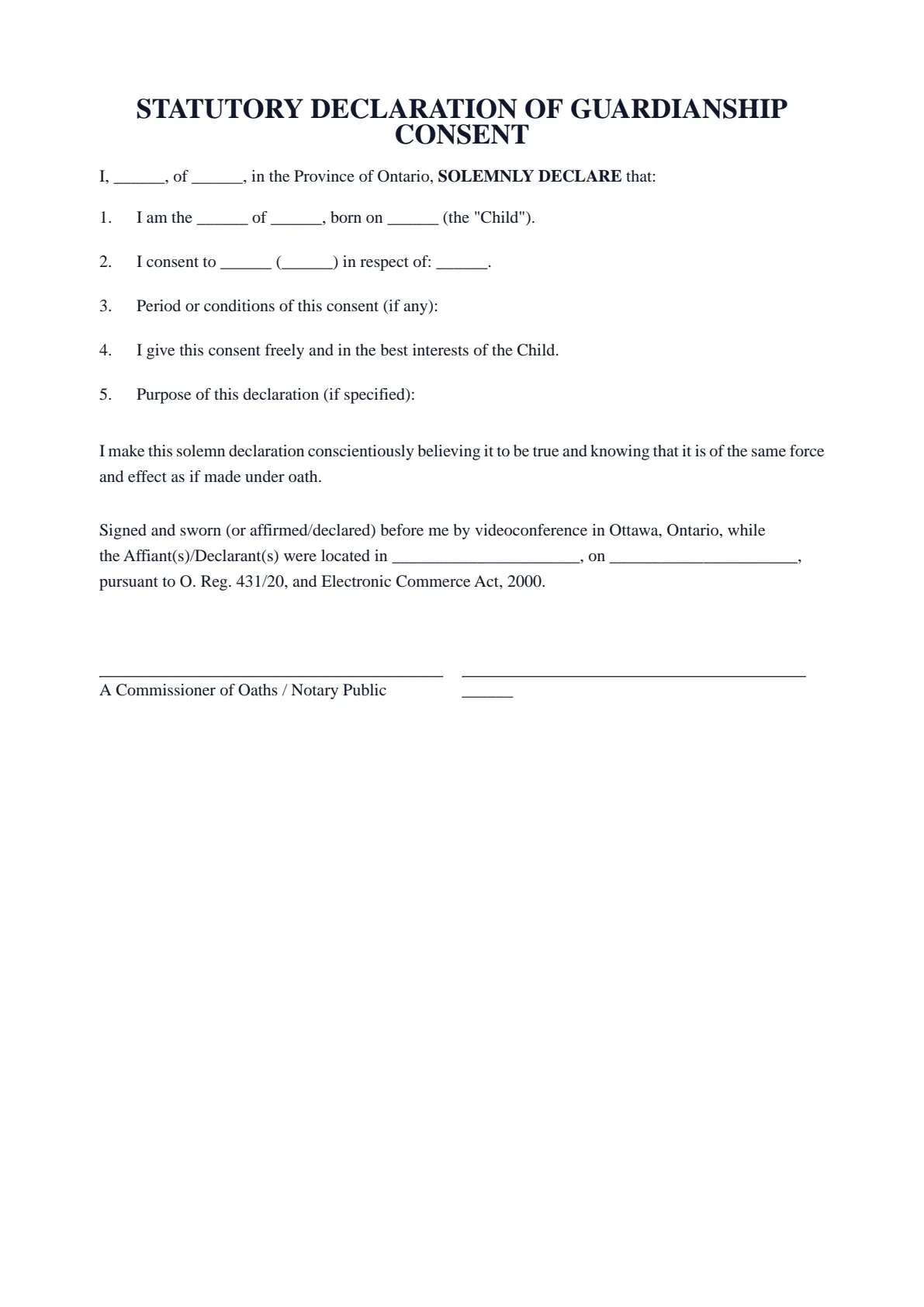
STATUTORY DECLARATION OF GUARDIANSHIP CONSENT
I, ______, of ______, in the Province of Ontario, SOLEMNLY DECLARE that:
I am the ______ of ______, born on ______ (the "Child").
I consent to ______ (______) in respect of: ______.
Period or conditions of this consent (if any):
I give this consent freely and in the best interests of the Child.
Purpose of this declaration (if specified):
I make this solemn declaration conscientiously believing it to be true and knowing that it is of the same force and effect as if made under oath.
Signed and sworn (or affirmed/declared) before me by videoconference in Ottawa, Ontario, while the Affiant(s)/Declarant(s) were located in ______________________, on ______________________, pursuant to O. Reg. 431/20, and Electronic Commerce Act, 2000.
A Commissioner of Oaths / Notary Public | ______ |
- 01Work your wayGuided or All fieldsFinish one section at a time, or see every question in one form.
- 02See the resultLive document previewWatch this document update as you add each answer.
- 03Keep your placeSave and restore a draftSave progress in this browser, then restore it later on this device.
How it works
Prepare your document, one step at a time.
Answer the questions, choose the download you need, then continue with signing or booking.
Overview
About this document
- 01
What is a guardianship consent declaration?
It is a sworn statement — also called a parental consent to guardianship — in which a parent consents to a named person acting as, or being appointed, guardian of their child.
It records the consenting parent’s agreement in support of the arrangement.
- 02
When you might need one
It supports guardianship arrangements.
- Another person will care for or be appointed guardian of your child.
- A court or agency asks for the consenting parent’s sworn statement.
- You are arranging temporary care and custody of your child.
- 03
Good to know
Guardianship is generally decided through the proper court or process; this declaration records a parent’s consent in support of it. Where both parents have rights, it is best for both to consent so the arrangement is not later questioned. For significant matters, obtain legal advice.
- 04
How to notarize a statutory declaration of guardianship consent in Ontario
After you fill in your statutory declaration of guardianship consent and download the PDF, do not sign it in advance. A sworn document must be signed in front of a notary public or commissioner for taking affidavits, who administers your oath or solemn affirmation first.
Minute Notary commissions your statutory declaration of guardianship consent online by secure video, under Ontario's remote commissioning rules (O. Reg. 431/20), or in person anywhere in Ontario. Bring valid government-issued photo identification.
Field guide
Every box, explained.
What each box in the Statutory Declaration of Guardianship Consent asks for, in the same order as the form. Tap or click any box below to see what it means, when it applies and how to fill it in.
- Boxes
- 10
- Required
- 8
- Sections
- 2
Before you start
Have your child's birth certificate or other ID for their name and date of birth, and the full name of the person you consent to. Decide which of the two consents you give, and for how long. Also have the government-issued photo ID you will show at the signing.
1.1Your full legal nameRequiredYour own full legal name, as the parent or legal guardian who gives the consent. The person who will look after your child goes in section 02.See how to fill it inHide the details
- What it means
- It opens the document ('I, …, of …, SOLEMNLY DECLARE that') and prints under your signature line. To solemnly declare is to state formally that something is true, before a commissioner (an official allowed to take oaths and declarations). The closing line gives it the same force as an oath. It tells the reader who gave the consent.
- When it applies
- The document has one 'I': one parent or guardian makes it. Under Ontario law, both parents are usually equally entitled to decision-making responsibility (the right to make significant decisions about a child's life). Where both have rights, the page says it is best for both to consent: each declares their own copy.
- How to fill it in
- Write your first, middle and last names in full, as on the government-issued photo ID you bring to the signing. Avoid nicknames and initials unless your ID uses them. The box fills both places where your name appears.
Example Your full legal name
Maria Lopez
SourcesJustice Laws Website: Canada Evidence Act (R.S.C., 1985, c. C-5)(official site, opens in a new tab)Ontario e-Laws: Children's Law Reform Act, R.S.O. 1990, c. C.12(official site, opens in a new tab)Ontario.ca: Parenting time, decision-making responsibility and contact(official site, opens in a new tab)1.2Your full addressRequiredYour full home address: where you live now.See how to fill it inHide the details
- What it means
- It prints in the opening line: 'I, [your name], of [your address], in the Province of Ontario'. With your name, it identifies you as the parent or guardian giving the consent.
- When it applies
- Use it even if you will be away, or your child will live with the other person, while the arrangement lasts. If you live outside Ontario, the fixed words 'in the Province of Ontario' would not be true for you: speak to the notary before you sign.
- How to fill it in
- Type it on one line with commas: unit, street number and name, city, province and postal code. Write your home address even if you will be elsewhere during a video appointment: the closing line records that place separately, on the day.
Example Your full address
Unit 4, 123 Example Street, Ottawa, ON K1A 0B1
1.3Your relationship to the childRequiredWhether you are the child's mother, father or legal guardian.See how to fill it inHide the details
- What it means
- Your choice prints in paragraph 1: 'I am the [choice] of [child's name], born on [date] (the "Child")'. It states why your consent counts, and you declare it true. The option prints as written, with its capital letter, such as 'I am the Mother of'.
- When it applies
- Pick the one that is true for you. If no option fits, for example you are a step-parent, a foster parent or a grandparent, or neither 'Mother' nor 'Father' describes you, speak to the notary before you sign.
- How to fill it in
- Click one round button; paragraph 1 in the preview changes at once. To change your answer, click another option. A pick can be switched but not emptied: only Clear, which empties the whole form, removes it.
The choices
- MotherPick it if you are the child's mother. It prints 'I am the Mother of' before the child's name.
- FatherPick it if you are the child's father. It prints 'I am the Father of' before the child's name.
- Legal guardianPick it if a court order or another legal paper makes you the child's guardian (legally responsible for the child). It prints 'I am the Legal guardian of'. A guardian of the child's property is responsible for managing that property. Unsure what your paper does? Ask a lawyer before you sign.
Good to know
Before you fill it in.
Short notes on this template. Worth a minute before you start.
- 01
Prepared for use in Ontario. A general template, not legal advice.
- 02
Fill it in online for free and download a ready-to-sign PDF — no account required.
- 03
Sign in front of the notary, who administers your oath or affirmation and applies the seal.
- 04
Notarize online by video across Ontario, or in person anywhere in Ontario.
Frequently asked
Questions about the Statutory Declaration of Guardianship Consent
- Does this appoint a guardian by itself?
- No. Guardianship is generally decided through the proper court or process. This declaration records a parent’s consent in support of the arrangement.
- Should both parents consent?
- Where both parents have rights, it is best for both to consent so the arrangement is not later questioned. Each can swear a copy.
- Can I notarize it online in Ontario?
- Yes. You can swear it online by video under Ontario’s remote commissioning rules, or in person anywhere in Ontario with Minute Notary.
- What should it include?
- Your relationship to the child, the child’s details, the proposed guardian, and what you are consenting to.
Keep exploring
Related templates
Other documents for passports, travel & children.
- 01Statutory Declaration of Guardianship of a Minor
A sworn declaration regarding the guardianship or care of a minor child — used to support a guardianship arrangement. Fill it in online, download a ready-to-sign PDF, and notarize in Ontario. Obtain legal advice for guardianship matters.
Fill it out - 02Statutory Declaration of Sole Support Parent
A sworn declaration that you are the sole-support parent of your child or children — used to support benefit, credit, or program applications. Fill it in online, download a ready-to-sign PDF, and notarize in Ontario.
Fill it out - 03Statutory Declaration of Revocation of Authorization
A sworn declaration revoking an authorization or consent you previously gave — used to formally end someone’s authority to act for you. Fill it in online, download a ready-to-sign PDF, and notarize in Ontario.
Fill it out - 04Statutory Declaration of Living Separate and Apart
A sworn declaration that you and your spouse or partner have been living separate and apart since a given date — for an organization that asks for a sworn separation date. Fill it in online, download a ready-to-sign PDF, and notarize in Ontario.
Fill it out
Ready to sign?
Ready to create your Statutory Declaration of Guardianship Consent?
Fill it in online, then download a ready-to-sign PDF or an editable Word copy. Use the generated PDF to continue to booking. Not sure what the appointment involves? Read about the Immigration Documents service first.