Statutory declarations
Statutory Declaration of Resumption of a Former Name
Free template from Minute Notary, an Ontario notary office. A sworn declaration that you are resuming a former or birth name — useful after a divorce or to confirm to banks and agencies the name you now use. Fill it in online, download a ready-to-sign PDF, and notarize in Ontario.
No charge until a notary signs it
Word files are editable. Review any changes carefully before signing or uploading.
Also known as
- Declaration to Resume Maiden Name
- Affidavit of Resuming Birth Name
- Former Name Declaration
+2 more names
- Resumption of Name Declaration
- Reverting to Maiden Name Affidavit
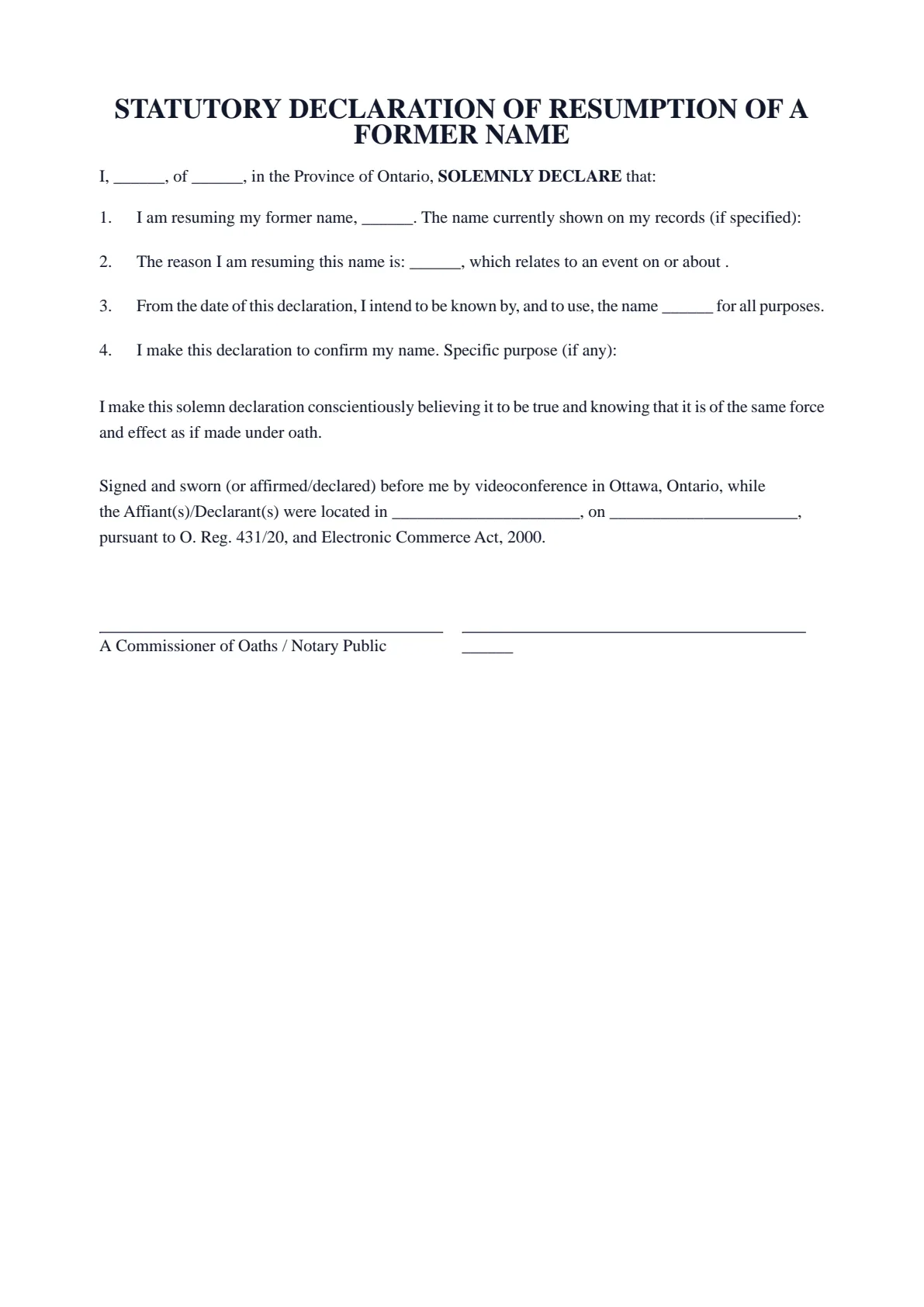
The blanks fill themselves in as you type.
- Scope
- General template, not legal advice
- Formats
- PDF + editable Word downloads
- Builder
- Live preview as you type
Document progress
1 of 7 fields complete
Drafts stay in this browser.
Avoid saving personal information on a shared or public device.
Recommended. Work through one section at a time.
Your full legal name*
Your full address*
Download now or complete it to use for booking.
1 of 4 required fields complete for booking.
STATUTORY DECLARATION OF RESUMPTION OF A FORMER NAME
I, ______, of ______, in the Province of Ontario, SOLEMNLY DECLARE that:
I am resuming my former name, ______. The name currently shown on my records (if specified):
The reason I am resuming this name is: ______, which relates to an event on or about .
From the date of this declaration, I intend to be known by, and to use, the name ______ for all purposes.
I make this declaration to confirm my name. Specific purpose (if any):
I make this solemn declaration conscientiously believing it to be true and knowing that it is of the same force and effect as if made under oath.
Signed and sworn (or affirmed/declared) before me by videoconference in Ottawa, Ontario, while the Affiant(s)/Declarant(s) were located in ______________________, on ______________________, pursuant to O. Reg. 431/20, and Electronic Commerce Act, 2000.
A Commissioner of Oaths / Notary Public | ______ |
- 01Work your wayGuided or All fieldsFinish one section at a time, or see every question in one form.
- 02See the resultLive document previewWatch this document update as you add each answer.
- 03Keep your placeSave and restore a draftSave progress in this browser, then restore it later on this device.
How it works
Prepare your document, one step at a time.
Answer the questions, choose the download you need, then continue with signing or booking.
Overview
About this document
- 01
What is a resumption of former name declaration?
It is a sworn statement — also called a declaration to resume a maiden name or former name declaration — confirming the former name you are resuming and your intention to use it going forward.
If your birth is registered in Ontario and you only used your spouse’s surname, Ontario law still recognizes the name on your birth certificate, and this declaration records that you are using it again. If you changed your surname by an election registered before April 30, 2021, you resume it by an election with the Registrar General instead.
- 02
When you might need one
It is commonly used after a divorce or to update records.
- Returning to your birth or maiden name after a divorce.
- A bank, employer, or agency asks for sworn proof of the name you now use.
- Your identification still shows a married name and records must be updated.
- 03
Good to know
Resuming a former name is different from a formal legal change of name. This declaration confirms the name you are returning to. It does not replace an election to resume a surname with the Registrar General, and whether an organization updates its records from it is its decision.
- 04
How to notarize a declaration to resume a former name in Ontario
After you fill in your declaration to resume a former name and download the PDF, do not sign it in advance. A sworn document must be signed in front of a notary public or commissioner for taking affidavits, who administers your oath or solemn affirmation first.
Minute Notary commissions your declaration to resume a former name online by secure video, under Ontario's remote commissioning rules (O. Reg. 431/20), or in person anywhere in Ontario. Bring valid government-issued photo identification so we can verify your identity before applying the notary seal.
Good to know
Before you fill it in.
Short notes on this template. Worth a minute before you start.
- 01
Prepared for use in Ontario. A general template, not legal advice.
- 02
Fill it in online for free and download a ready-to-sign PDF — no account required.
- 03
Sign in front of the notary, who administers your oath or affirmation and applies the seal.
- 04
Notarize online by video across Ontario, or in person anywhere in Ontario.
Frequently asked
Questions about the Statutory Declaration of Resumption of a Former Name
- Is this a legal change of name?
- No. Resuming a former name differs from a formal change of name. This declaration confirms the name you are returning to so others can update their records.
- Will every agency accept it?
- Whether an agency accepts it is its decision, and confirming that is your responsibility. If you changed your surname by an election registered with the Registrar General before April 30, 2021, going back needs an election to resume your surname with the Registrar General.
- Can I notarize it online in Ontario?
- Yes. You can swear it online by video under Ontario’s remote commissioning rules, or in person anywhere in Ontario with Minute Notary.
- When is it commonly used?
- Most often after a divorce, to return to a birth or maiden name and update bank, employer, and agency records.
Keep exploring
Related templates
Other documents for name, birth & civil status.
- 01Statutory Declaration of Date of Birth
A sworn declaration confirming your date of birth — used when a birth certificate is unavailable or a record shows the wrong date. Fill it in online, download a ready-to-sign PDF, and notarize in Ontario.
Fill it out - 02Statutory Declaration of Parentage (Ontario)
A sworn statement in which a parent confirms who a child's parents are, for a school, passport office, benefits program or other office that asks for written proof of parentage.
Fill it out - 03Statutory Declaration of Living Separate and Apart
A sworn declaration that you and your spouse or partner have been living separate and apart since a given date — for an organization that asks for a sworn separation date. Fill it in online, download a ready-to-sign PDF, and notarize in Ontario.
Fill it out - 04Affidavit of Identity for a Minor Child
A sworn affidavit by a parent or guardian confirming a child’s identity and particulars — for an office or institution that asks a parent for one. Fill it in online, download a ready-to-sign PDF, and notarize in Ontario.
Fill it out
Ready to sign?
Ready to create your Statutory Declaration of Resumption of a Former Name?
Fill it in online, then download a ready-to-sign PDF or an editable Word copy. Use the generated PDF to continue to booking. Not sure what the appointment involves? Read about the Statutory Declarations service first.