Corporate & business
Statutory Declaration of Sole Proprietorship
Free template from Minute Notary, an Ontario notary office. A sworn declaration confirming that you operate a business as a sole proprietor — used for banking, suppliers, or confirming who is behind a business name. Fill it in online, download a ready-to-sign PDF, and notarize in Ontario.
No charge until a notary signs it
Word files are editable. Review any changes carefully before signing or uploading.
Also known as
- Sole Proprietor Affidavit
- Declaration of Sole Proprietorship
- Sworn Statement of Sole Proprietor
+1 more names
- Sole Proprietorship Confirmation
The blanks fill themselves in as you type.
- Scope
- General template, not legal advice
- Formats
- PDF + editable Word downloads
- Builder
- Live preview as you type
Document progress
1 of 6 fields complete
Drafts stay in this browser.
Avoid saving personal information on a shared or public device.
Recommended. Work through one section at a time.
Your full legal name*
Your full address*
Download now or complete it to use for booking.
1 of 6 required fields complete for booking.
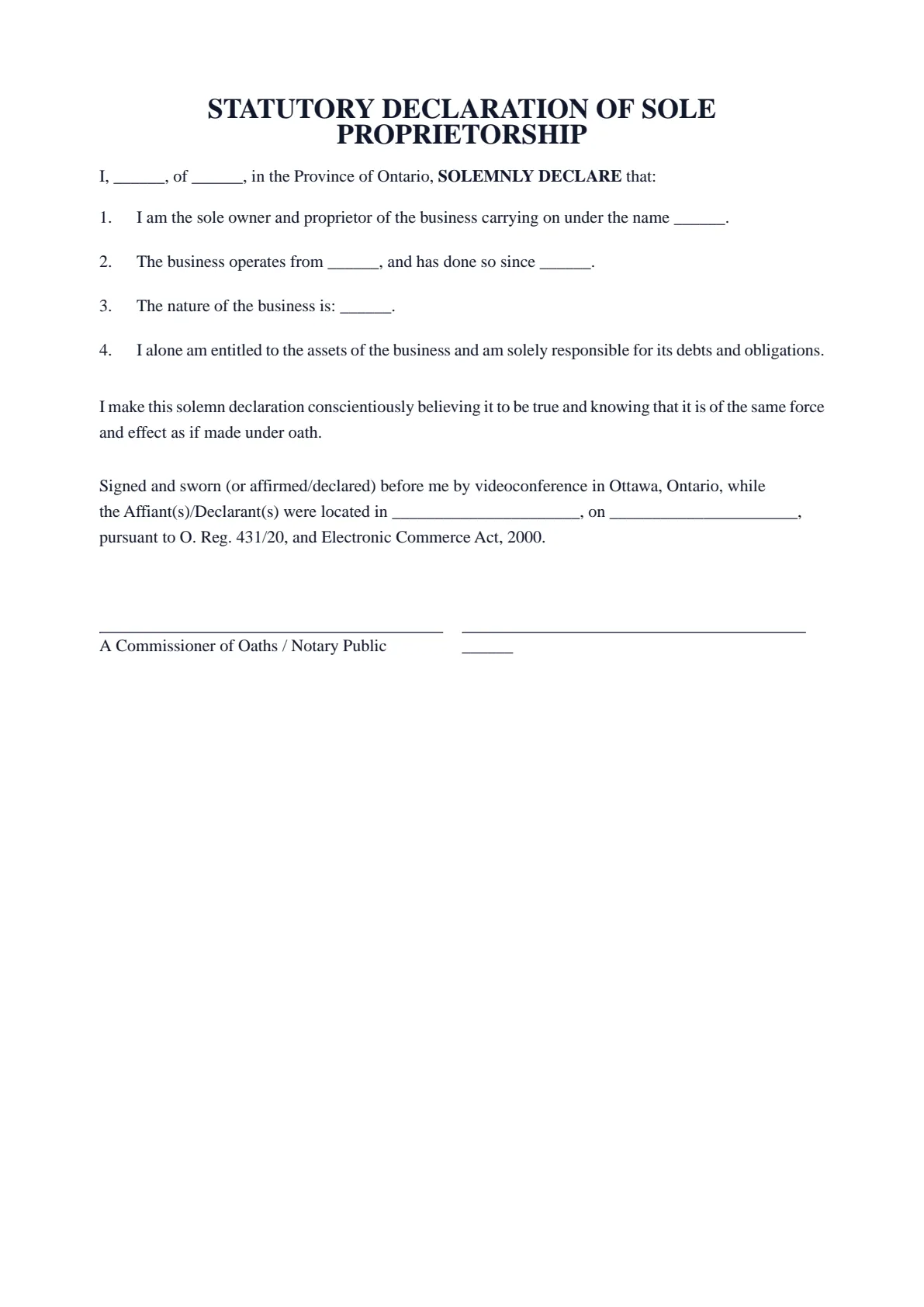
STATUTORY DECLARATION OF SOLE PROPRIETORSHIP
I, ______, of ______, in the Province of Ontario, SOLEMNLY DECLARE that:
I am the sole owner and proprietor of the business carrying on under the name ______.
The business operates from ______, and has done so since ______.
The nature of the business is: ______.
I alone am entitled to the assets of the business and am solely responsible for its debts and obligations.
I make this solemn declaration conscientiously believing it to be true and knowing that it is of the same force and effect as if made under oath.
Signed and sworn (or affirmed/declared) before me by videoconference in Ottawa, Ontario, while the Affiant(s)/Declarant(s) were located in ______________________, on ______________________, pursuant to O. Reg. 431/20, and Electronic Commerce Act, 2000.
A Commissioner of Oaths / Notary Public | ______ |
- 01Work your wayGuided or All fieldsFinish one section at a time, or see every question in one form.
- 02See the resultLive document previewWatch this document update as you add each answer.
- 03Keep your placeSave and restore a draftSave progress in this browser, then restore it later on this device.
How it works
Prepare your document, one step at a time.
Answer the questions, choose the download you need, then continue with signing or booking.
Overview
About this document
- 01
What is a sole proprietorship declaration?
It is a sworn statement — also called a sole proprietor affidavit — confirming that a business is carried on by you as a sole proprietor, that there are no other owners, and the trade name if one is used.
Use it when a bank or supplier asks you for a sworn statement of who is responsible for the business.
- 02
When you might need one
It is used in banking and business dealings.
- A bank asks for sworn confirmation that you own the business alone.
- Confirming to a supplier or partner who owns the business.
- Linking a trade name to you as the sole proprietor.
- 03
What to include
Identify yourself, the business and any trade name, the nature of the business, and that you are the sole owner and personally responsible. If you only need to confirm a trade name, a trade or operating name declaration may fit instead.
- 04
How to notarize a statutory declaration of sole proprietorship in Ontario
After you fill in your statutory declaration of sole proprietorship and download the PDF, do not sign it in advance. A sworn document must be signed in front of a notary public or commissioner for taking affidavits, who administers your oath or solemn affirmation first.
Minute Notary commissions your statutory declaration of sole proprietorship online by secure video, under Ontario's remote commissioning rules (O. Reg. 431/20), or in person anywhere in Ontario. Bring valid government-issued photo identification.
Field guide
Every box, explained.
What each box in the Statutory Declaration of Sole Proprietorship asks for, in the same order as the form. Tap or click any box below to see what it means, when it applies and how to fill it in.
- Boxes
- 6
- Required
- 6
- Sections
- 2
Before you start
Have at hand your government-issued photo ID and, if the business uses a name other than your own, its Business Name Registration. Know the address the business operates from and the date it started there. This declaration is for one person who owns a business alone.
1.1Your full legal nameRequiredYour first, middle and last names in full. You are the declarant (the person making this declaration) and the owner of the business.See how to fill it inHide the details
- What it means
- It prints in the opening, 'I, [name], of [address], in the Province of Ontario, SOLEMNLY DECLARE that', and under your signature line. To solemnly declare is to state formally that something is true. The closing line gives it the same force as an oath.
- When it applies
- Paragraph 1 says you are the 'sole owner'. Fixed paragraph 4 says you alone are entitled to the business's assets and solely responsible for its debts. With a partner or co-owner, or an incorporated business, those lines would not be true: ask the bank or office that asked for it which document fits you.
- How to fill it in
- Write it as on the government-issued photo ID the page asks you to bring. No nicknames or initials unless the ID uses them. It is your own name: the business name has its own box below.
Example Your full legal name
Maria Lopez
1.2Your full addressRequiredYour own home address, where you live now: street number and name, unit, city, province and postal code.See how to fill it inHide the details
- What it means
- It prints right after your name, 'of [address], in the Province of Ontario', and helps identify you. The business's address has its own box, even if you run the business from home.
- When it applies
- If you live outside Ontario, the fixed words 'in the Province of Ontario' would not be true for you: speak to the notary before you sign.
- How to fill it in
- Type it on one line with commas. The box is plain text, with no address lookup. If the business runs from your home, the same address goes in both boxes.
Example Your full address
123 Example Street, Unit 4, Ottawa, ON K1A 0B1
Good to know
Before you fill it in.
Short notes on this template. Worth a minute before you start.
- 01
Prepared for use in Ontario. A general template, not legal advice.
- 02
Fill it in online for free and download a ready-to-sign PDF — no account required.
- 03
Sign in front of the notary, who administers your oath or affirmation and applies the seal.
- 04
Notarize online by video across Ontario, or in person anywhere in Ontario.
Frequently asked
Questions about the Statutory Declaration of Sole Proprietorship
- What is a sole proprietorship declaration for?
- To confirm under oath that you operate a business as a sole proprietor and are personally responsible for it — for banking, suppliers, or confirming who is behind a business name.
- Is this the same as registering a business?
- No. Registering a business name is a separate step. This declaration confirms you operate as a sole proprietor.
- Can I notarize it online in Ontario?
- Yes. You can swear it online by video under Ontario’s remote commissioning rules, or in person anywhere in Ontario with Minute Notary.
- What should it include?
- You, the business and any trade name, the nature of the business, and that you are the sole owner.
Keep exploring
Related templates
Other documents for business & corporations.
- 01Statutory Declaration of Trade or Operating Name in Use
A sworn declaration that a business is carried on under a particular trade or operating name — useful to confirm a business name to a bank or supplier that asks. Fill it in online, download a ready-to-sign PDF, and notarize in Ontario.
Fill it out - 02Statutory Declaration of Sole Support Parent
A sworn declaration that you are the sole-support parent of your child or children — used to support benefit, credit, or program applications. Fill it in online, download a ready-to-sign PDF, and notarize in Ontario.
Fill it out - 03Statutory Declaration of Solvency (No Bankruptcy)
A sworn declaration that you, or a business, are solvent and not bankrupt — for a tender, contract or lender that asks for a sworn statement of solvency. Fill it in online, download a ready-to-sign PDF, and notarize in Ontario.
Fill it out - 04Statutory Declaration of No Outstanding Debts
A sworn declaration that you have no outstanding debts of a stated kind — used to support a clearance, transaction, or application. Fill it in online, download a ready-to-sign PDF, and notarize in Ontario.
Fill it out
Ready to sign?
Ready to create your Statutory Declaration of Sole Proprietorship?
Fill it in online, then download a ready-to-sign PDF or an editable Word copy. Use the generated PDF to continue to booking. Not sure what the appointment involves? Read about the Notarizing Signatures service first.